Looking at this new updated version it’s now completely restricted with what I can make with it and I can no longer create scenes within the headset itself(or edit them) which is locked behind a subscription just to use it at all. I know the app is trying to be a bit more like Scenery, but if I wanted more or less of the same thing I would just use Scenery or STYLY instead. What originally got me interested in Story was that I had the freedom to create things quickly without any sort of limitations(No subscriptions or project size limit) on top of being able to make adjustments on the fly within the headset.
As an ex-Adobe Aero content creator, this app to me was what I wanted Aero to become if they did release a version of Aero made for headsets. Adobe also announced that they were shutting down the Aero app/ service and I was hoping that Story would be a great place to remake my old Aero Projects, but now it’s just become another Scenery-esk app where I would have to pay a subscription just to do anything on it.
I understand that you guys need monetization/ money to run it, which I can understand if your goal is more oriented to the business side of things and less about getting content creators interested in your platform.
If you still want me to actively use Story as a content creator and get me to pay for it, I would be interested in doing a one time payment so that I can have all the features that the previous version of Story had with some sort of “creator” license so that I can continue to actively use the app for my creative needs(Spatial UI concepts/ animations, Static spatial gameplay scene concepts, reviewing and controlling USDZ 3D models). As much as I would love to continue using Story to experiment and create content with it, the subscription requirement lost whatever hope I originally had going for it.
Thank you so much for taking the time to share such thoughtful feedback — we truly appreciate how deeply you’ve engaged with Story since the early versions.
We completely understand your frustration about not being able to create scenes directly inside Vision Pro anymore. The main reason behind this change is that, after gathering a lot of feedback from creators, we found that building and editing complex timelines directly in the headset can become quite tiring — especially with all the new features we’ve introduced is this big update (like Events, Anchors, and Parameters).
To ensure creators can work faster and more comfortably, we decided to temporarily move the editor to macOS, where precision and workflow efficiency are much higher. That said, we’re actively redesigning a new visionOS creation experience — one that will bring back in-headset editing with better usability and higher creative efficiency. Until that vision is ready, all creation will take place on macOS.
As for the subscription model — all features and tools in Story remain free to use for creators. We only start charging when projects grow larger or more commercially valuable (for example, over 100 MB or more than 5 contents). Our goal isn’t to limit creativity, but to make sure the platform is sustainable while keeping it free for most creators exploring and experimenting. We want our success to come naturally when creators gain real value from Story.
We truly hope you’ll continue exploring the new version — many of the underlying improvements were made with creators like you in mind.
Thanks again for sharing your perspective and for being part of the Story community.
As it is right now from testing out the new ProStory app, free users are limited to creating Story experiences exclusively on ProStory for Mac. You can’t even export any of the project types to the headset without paying the subscription, so the experiences are essentially locked to ProStory for now… unless I’m missing something.
I tried to pair my Vision Pro with my Macbook Pro between the two Story apps to see if that did anything, but it didn’t seem to do anything. Like I said I was just trying it out so I might’ve missed some sort of info for how the device pairing system is supposed to work… or it could be bugged. From looking around the Story website I couldn’t find any information as to how it’s supposed to work or find a place where I could learn how the features of each app works.
Those issues aside, as long as you have your legacy projects on your Vision Pro you can still view them by changing the file names(.story to .storyproj and vise versa) and view them both on the Vision Pro and view/ edit it in ProStory, but aside from that it still feels limited.
So question for the syncing feature, what exactly is it supposed to do? Is it supposed to share the files onto the Vision Pro or is it supposed to be a Mac streaming feature for seeing the editing process in real time(So something similar to Polyspatial/ play to device from Unity)?
OK, so it seems like I’ll have to be wearing the Vision Pro(While using something like the Virtual Mac Display) In order for it to actually do something.
Also one last thing for clarification, does it sync while I’m editing a project/ having a project open while doing nothing or does it sync when I’m in the Pro Story Menu where it would sync all of the existing files from Pro Story? How long does it usually take? How or where would I be able to tell if it has started the syncing process?
Edit: I think it would be useful to have a progress bar appear for the syncing process so that I would know that it’s doing something.
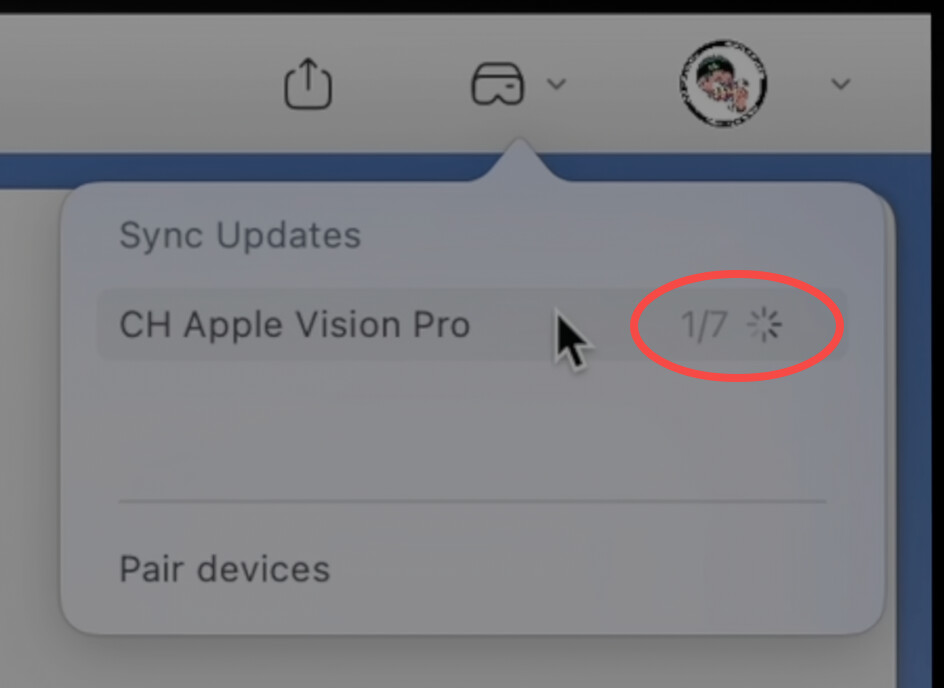
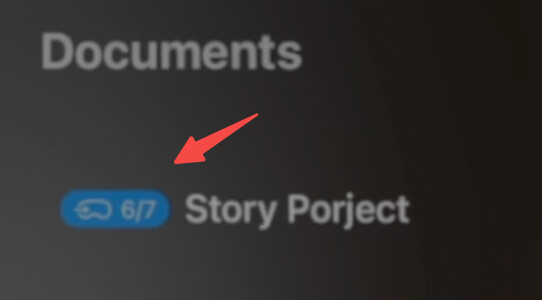
There is an indicator of the syncing progress, if you click on the device you will see the detail of what file is syncing. The indicator is also available in the Story app. (Please refer the two screenshots below)
The sync speed is theoretically very fast because we are performing incremental updates within a local network. And we are actively optimizing the speed.